
Table Scorer
Once someone goes Mahjong, Table Scorer works out exactly what the hand is worth and who pays what. There are three ways to give it the hand: a photo of the winning tiles, the Manual Calculator, or Score this hand straight from the Live Co-Pilot.
Choose your scoring tool
At the top of Table Scorer, under Select Referee Scoring Tool, pick one of two:
App Camera Referee
Photograph the winning hand. The app reads every tile, groups them into sets, asks you to confirm anything it can't see from a photo, then scores the hand with your rule set's own scoring engine.
Manual Calculator
Enter the hand yourself — sets, bonus tiles and how it was won — and see the score and payments update live. Best when you'd rather not use the camera, or to double-check a camera result.
Camera Referee, step by step
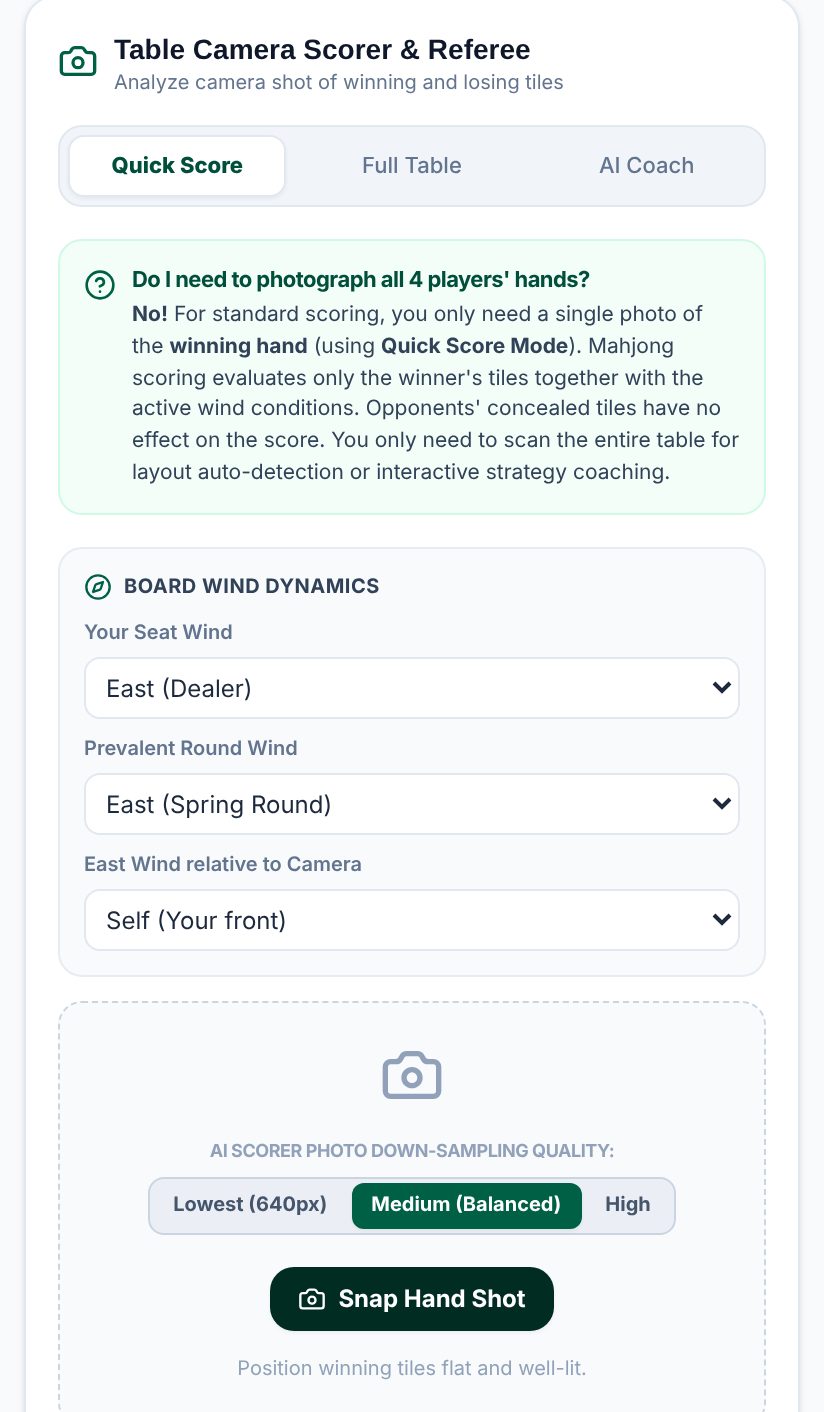
Quick Score or Full Table
Quick Score takes one photo of the winning hand — for scoring, that's all you need, because only the winner's tiles count. Full Table walks you through four steps instead: photograph the whole table, tap who declared Mahjong, choose how they won, and confirm.
Set the winds
Under Board Wind Dynamics, set Your Seat Wind (the seat of the player being scored — East is the dealer), the prevalent round wind, and where East sits relative to the camera.
Choose photo quality, then Snap Hand Shot
Lay the winning tiles flat and well lit, with exposed sets kept together. Medium suits most phones.
Confirm each set
The app shows every set it found. A photo can't tell whether a set was called from another player, so tap Open (Exposed) or Concealed for each Pung and Kong — and, in MCR and Riichi, each Chow too, because a concealed hand scores differently there. Tap any tile to correct a misread.
Answer the win conditions
Your rule set's own panel appears — how the hand was won, which tile won it, and special wins such as a Kong replacement or robbing a Kong. See the table below.
Calculate Final Score
You'll see the total, every scoring item with its value, and the payments. Open Full Scoring Breakdown for the details and any notes on items that weren't counted. If the hand can't be scored — too few tiles, or no legal hand — the app says why.
Log it, or tweak it
Log this hand to Score Sheet records the result in your session, already set to the seat and the way of winning you just scored. Test & Tweak Scoring Method in Manual Calculator loads the same hand into the Manual Calculator to experiment.
The photo's credit covers scoring that hand. If you correct a tile, change an Open/Concealed choice or a win condition, or add a Flower on the result screen, the hand is scored again without using another credit.
Older and worn tiles
The camera reads each tile's markings from the photo. Tiles that are faded, chipped, yellowed or stained, or that use an unusual artistic style, can be harder to recognise, and a tile may be read as the wrong one. The app scores exactly what it's shown, so always check the tiles before you score.
Tap any tile to correct it
Correcting a tile is free. Check the Open/Concealed choices at the same time.
Give the camera a clear view
Use good, even lighting without glare, lay the tiles flat, and hold the camera directly above them. Try High photo quality for small or worn tiles.
Retake when the app warns you
If some tiles were hard to read, a Photo May Need Retaking card appears. Tap Retake Photo and the credit for the unclear photo is given back.
Or skip the camera
For a set the camera struggles with, enter the hand in the Manual Calculator, or use Score this hand from the Live Co-Pilot (below).
Scoring a hand from the Live Co-Pilot
If you played the hand in Live Co-Pilot, you don't need a photo. When the Co-Pilot shows Hand Complete!, tap Score this hand:
The hand arrives ready
Table Scorer opens with your tiles already grouped and every set's Open/Concealed status filled in from the game. How you won (self-draw or discard) and the winning tile are set for you too, and your seat follows your Wind Designation.
Check, then Calculate Final Score
Answer any win conditions the Co-Pilot couldn't know — Riichi declared, last tile, a Kong replacement — and tap Calculate Final Score. This uses 1 scan credit, as a photo would. Looking at the result again, or re-scoring after a change, is free.
Every rule set except Vietnamese offers this button — Vietnamese hands are scored in the Manual Calculator. In Custom Hands it names the hand you made, as the camera does.
What the camera scores in each rule set
| Rule set | Win conditions you'll be asked | How it's scored |
|---|---|---|
| MCR | On a Discard or Self-Drawn; tap the winning tile; Last tile of its kind (+4); Last tile of the wall or last discard (+8); Won on a Kong replacement (+8); Robbing the Kong (+8). | The full 81-fan catalogue with its exclusion rules and the 8-fan minimum. Flowers add 1 point each but don't count toward the minimum. |
| Riichi | Ron or Tsumo; the winning tile (required on Ron, optional on Tsumo); Riichi, Double Riichi, Ippatsu, Haitei or Houtei, Rinshan, Chankan; dora indicators. | WRC 2022 han and fu, with limit hands; 13+ counted han is capped at Sanbaiman. The winning tile decides the wait fu and whether a triplet counts as concealed — why it matters. |
| NMJL 2026 | None at this step. | The hand is matched to its 2026 card line and valued from the card. Log it to the Score Sheet, where how it was won, Jokerless and who pays are applied. |
| Taiwanese | None at this step. | The Tai you can see in the tiles — winds, dragons, Kongs, Flowers, concealed Pongs, flushes and more. Add situational Tai in the Manual Calculator. |
| Singapore | On a Discard or Self-Drawn; winning tile; Replacement Tile (+1); last New Tile (+1); which Kong was robbed; how each exposed Kong was made. | Karl Weiss's Fan rules with your table's Minimum Fan and Fan Limit, the payments, and automatic Pay All when the exposed sets call for it. Add or remove Flowers and Animals on the result to re-score. |
| Vietnamese | Not available from the camera yet — Vietnamese scoring depends on which named pattern you claim and what each Joker stood in for, which a photo can't show. A photo still uses a credit, so score Vietnamese hands in the Manual Calculator instead. | |
| Custom Hands | The camera names which of the 177 hands you've made. To score it, use the Custom Hands Score Sheet, which has its own scan for each player's tiles. | |
The Manual Calculator
The Mahjong Ruleset Style dropdown follows the rule set in the top bar, but you can switch it to try another scoring system on the same hand.
| Scoring style | What you enter |
|---|---|
| Chinese Official / MCR | Tick fan from the 81-fan catalogue — filter by value tier, search by name, or use a quick preset. Exclusions and the 8-fan minimum are checked for you. More |
| Japanese Riichi | Han, fu, dora, a Yakuman choice, situational yaku (Riichi, Menzen Tsumo, Ippatsu, Rinshan, Chankan, last tile), Tsumo or Ron and who discarded. More |
| NMJL 2026 Card | The hand's value from the card, Jokerless, and Self-Draw or Discard. Shows who pays what. More |
| Taiwanese — LRC Club Rules or Standard | The LRC club's full checklist, or a simpler Tai count. More |
| Singapore | The hand set by set, Flowers and Animals, how it was won, and the payouts made during play. More |
| Hong Kong | Your rule book, faan limit and minimum, then any limit hand, how the hand was won, the hand pattern, dragons and winds, and Flowers. More |
| Vietnamese | Classic or Modern, named patterns, Jokers replaced and Joker combinations, Flowers. More |
| Custom Mahjong Hands | Your sets for a counted hand, or the booklet hand you completed, plus Flowers and how you went Mahjong. More |
Table Scorer values a single hand. To keep running totals across a session — who's up, who's down, and by how much — use Score Sheet.