Rack Analyst
Point your camera at your tiles, and get a complete strategic recommendation back in seconds — what to keep, what to discard, and how likely each realistic hand is to come together.
How to use it
Take Rack Photo
Lay your tiles out and tap Take Rack Photo. The camera reads every tile's suit and value, regardless of orientation. Choose Lowest, Med or High photo quality first — Med suits most phones; try High if tiles are small or far away.
Check the rack, fix anything misread
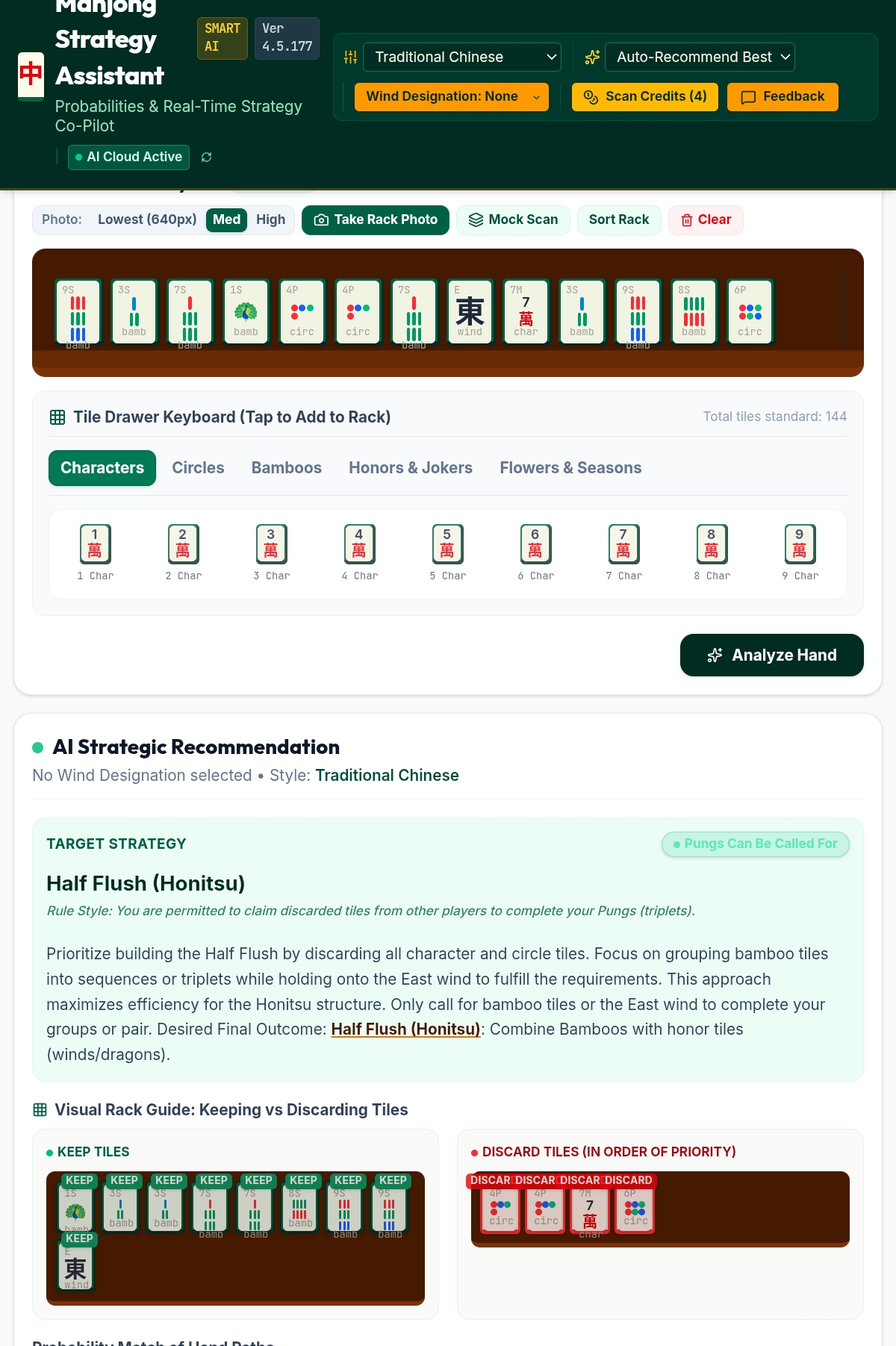
Your scanned rack appears as a row of tiles. If any tile was misread, tap it to correct it, or use the Tile Drawer Keyboard below to add tiles by hand — this never costs a scan credit.
Tap Analyze Hand
The app calculates every realistic hand your rack could complete, ranks them by likelihood, and works out the best keep/discard plan for the strongest one.
Read the Target Strategy card
This names the hand being recommended, explains the reasoning in plain language, and notes any special rule conditions (like whether pungs can be called from other players).
Follow the Visual Rack Guide
Tiles are laid out in two groups — green Keep tiles and red Discard tiles, in priority order. Discard the top one first.
Reading the probability list
Below the main recommendation, Probability Match of Hand Paths lists every other hand your rack has a realistic shot at, each with its own win percentage. If you'd rather chase one of the alternatives instead of the top pick, tap Target This Strategy on that entry — the whole keep/discard plan updates to match it.
Use Sort Rack after adding tiles by hand to lay everything out in suit order — it doesn't change your tiles, just how they're displayed.
In Riichi, Singapore, Vietnamese and Custom Hands, a small Seat: … / Round: … badge appears near the top of this panel, confirming exactly what context is feeding the recommendation below. See Getting Started for which rule sets use the winds.
Camera-based tile recognition is very accurate, but it isn't perfect — similar suits, tricky lighting, tile angle, or a physically worn tile can occasionally cause a misread. The app has no way to know the scan is wrong unless you tell it, so it will confidently analyze whatever rack it thinks it sees, even if that's not what's actually on your table.
Before tapping Analyze Hand, take a second to read through the scanned row and confirm every tile matches what's physically in front of you. If anything's off, tap that tile to correct it, or use the Tile Drawer Keyboard to add or fix tiles by hand — none of this costs a scan credit, only the original photo does.
Older and worn tiles: tiles that are faded, chipped, yellowed or stained, or that use an unusual artistic style, are harder for the camera to recognise and may be read as the wrong tile. Use good, even lighting, lay the tiles flat, keep the camera directly above them, and try High photo quality. If the scan comes out badly, simply take the photo again before tapping Analyze Hand — the first photo's credit is given back.
Tap Clear to stop any recommendation in progress and reset the screen completely, including your rack.
How it changes by rule set
| Rule set | What's different in Rack Analyst |
|---|---|
| MCR | A 14-tile rack. The target list holds all 81 official fan. Lock one to see your progress toward it; fan that depend on how you win (such as Self-Drawn or Last Tile) explain that instead of showing progress. Flowers are bonus tiles — set them aside. |
| Riichi | A 14-tile rack, with an optional Dora and Furiten panel: add up to five dora indicators to see how many dora you hold, and tick I'm currently furiten if it applies. The result tells you when you're tenpai and which tiles win, and a complete 14-tile rack is recognised as a win. |
| NMJL 2026 | The rack is matched against the official 2026 card lines, with Jokers on the Honors & Jokers tab and a Charleston helper for the passes. |
| Taiwanese | A 17-tile rack — Taiwanese hands are 16 tiles plus the one you've just drawn. 22 named target hands. |
| Singapore | An Animals tab joins Flowers & Seasons. Flowers and Animals you've set aside count toward the Fan. 16 target hands from Karl Weiss's book, and your table's Minimum Fan is respected — a complete hand that's below it is flagged, not shown as a win. |
| Vietnamese | The Jokers and the Big Flower are on the Honors & Jokers tab, and a Classic / Modern switch sits on the panel. No target dropdown — it always recommends the best hand. |
| Custom Hands | All 177 named hands. Each recommendation says whether that hand lets you call Pungs from other players or must stay concealed. |