The NMJL 2026 Card
The National Mah Jongg League publishes a new card of official hands every year. NMJL 2026 Card mode builds the entire app around that specific card — hand matching, Live Co-Pilot suggestions, Table Scorer identification, and Score Sheet scoring are all driven by the actual 2026 line list, not a generic hand-building engine. This page covers what's different about it and how each tool uses it.
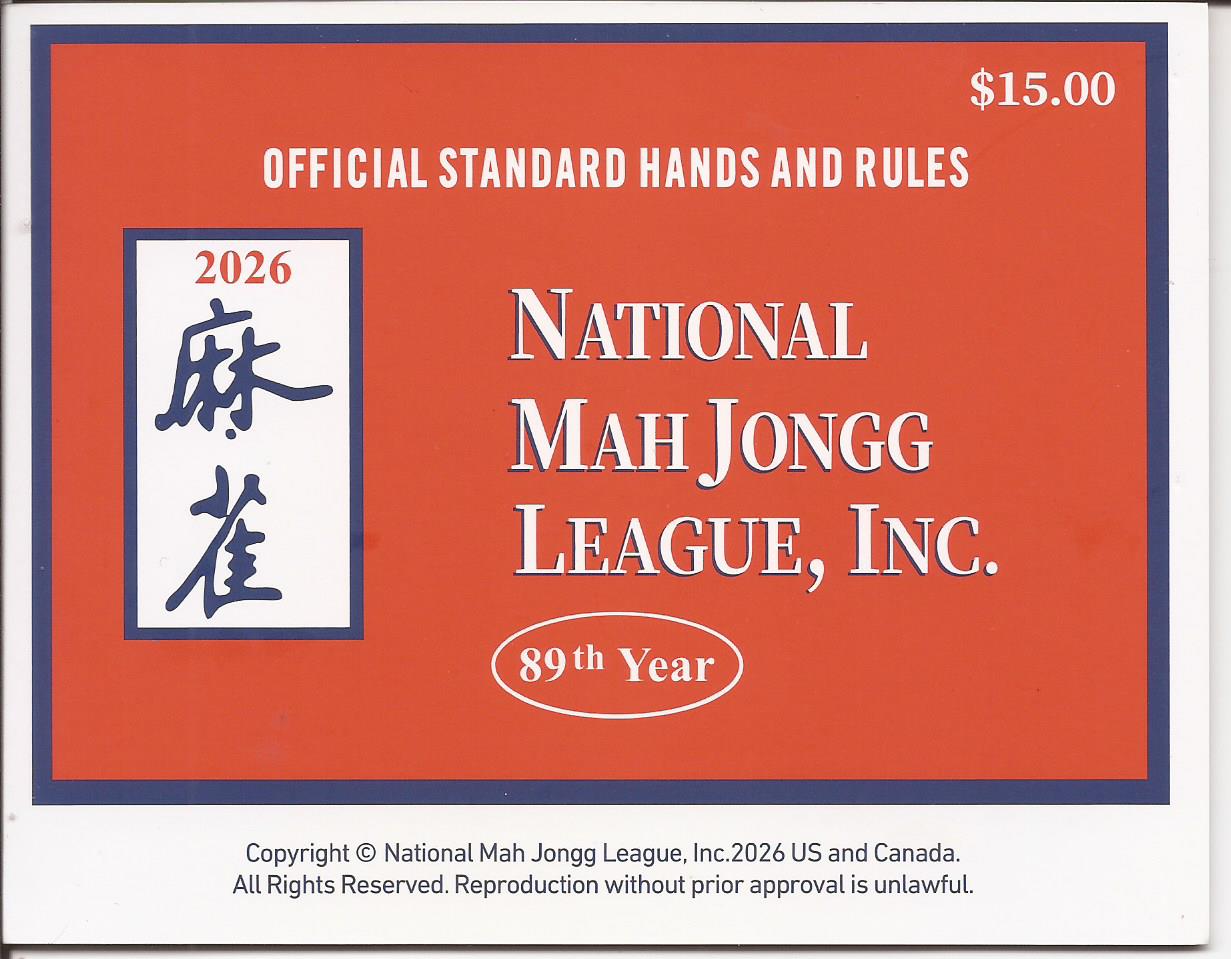
Mahjong Strategy Assistant (mahjongai.app) is an independent app. It is not affiliated with, endorsed by, licensed by or associated with the National Mah Jongg League. "National Mah Jongg League" and "NMJL" are used only to identify the card the app works with, and the card cover is shown only so players can recognise it. The app is designed to be used alongside the official NMJL card, which players should buy from the National Mah Jongg League each year.
What's different about this mode
Every other ruleset in this app lets you build toward a hand shape freely, then scores whatever you end up with. NMJL 2026 Card mode works the opposite way around: your rack is matched directly against the official card's published line list, and only a hand that genuinely appears on the card — in the exact structure that line requires — counts as a legal target. This is why you'll see hands referred to by their card position, like 2026 — Line 1 or Winds Dragons — Line 2, rather than descriptive names the way Custom Hands mode uses them.
This mode is matched only against the current year's official card. The older general "American (NMJL)" option has been retired.
The rules, and what the app does with them
| The rule | What the app does with it |
|---|---|
| Only hands on the card win, in exactly the structure the line shows. | Your rack is matched against every 2026 line. Hands are named by card position, such as 2026 — Line 1. |
| Jokers stand in for any tile in a Pung, Kong, Quint or Sextet — never in a single or a pair. | The advice only uses your Jokers where they're allowed, and never suggests passing one in the Charleston. |
| Joker exchange. You may swap the real tile for a Joker in any exposed group. | Live Co-Pilot shows Joker Exchange Available when you hold the tile a Joker stands for. |
| Exposed (X) or Concealed (C). X lines may call Pungs, Kongs, Quints and Sextets; C lines stay concealed except for the winning tile. | Each line shows its X or C badge, and Live Co-Pilot only suggests calls the line allows. |
| Flowers are part of the hand, not bonus tiles. | Flowers go into your rack like any other tile, on their own tab. |
| The White Dragon doubles as Soap — the 0 in year hands such as 2026. | A White Dragon is read either way, whichever the line needs, and labelled Soap (as Zero) when it stands for 0. |
| The Charleston — passing three tiles right, across and left before play. | The Charleston helper suggests which three tiles to pass on each pass. |
| Paying. The card gives the hand's value; Jokerless and self-picks pay more. | The Score Sheet settles a hand by Payout or Tournament scoring — see below. |
Selecting NMJL 2026 Card
Choose it from the ruleset dropdown
Open the ruleset selector in the top bar and choose NMJL 2026 Card. A second dropdown appears next to it, labeled NMJL 2026 Card, for picking a specific target hand — for example Winds Dragons — Line 2.
Leave it on auto, or lock a target
Leave this on the app's own top recommendation to get suggestions across the whole card, or lock it onto one specific hand if you already know which line you're chasing. This mirrors how Target Strategy works in Custom Hands mode.
Watch the card-position counter
Next to the hand dropdown, a small counter (for example 0 / 55) tracks your position against the full set of hands on the card, so you always know how many lines you're working from.
Rack Analyst with NMJL 2026
Tap your 14 tiles in from the Craks, Dots, Bams, Honors & Jokers and Flowers tabs (or scan your rack), then tap Analyze Hand.
Target Strategy
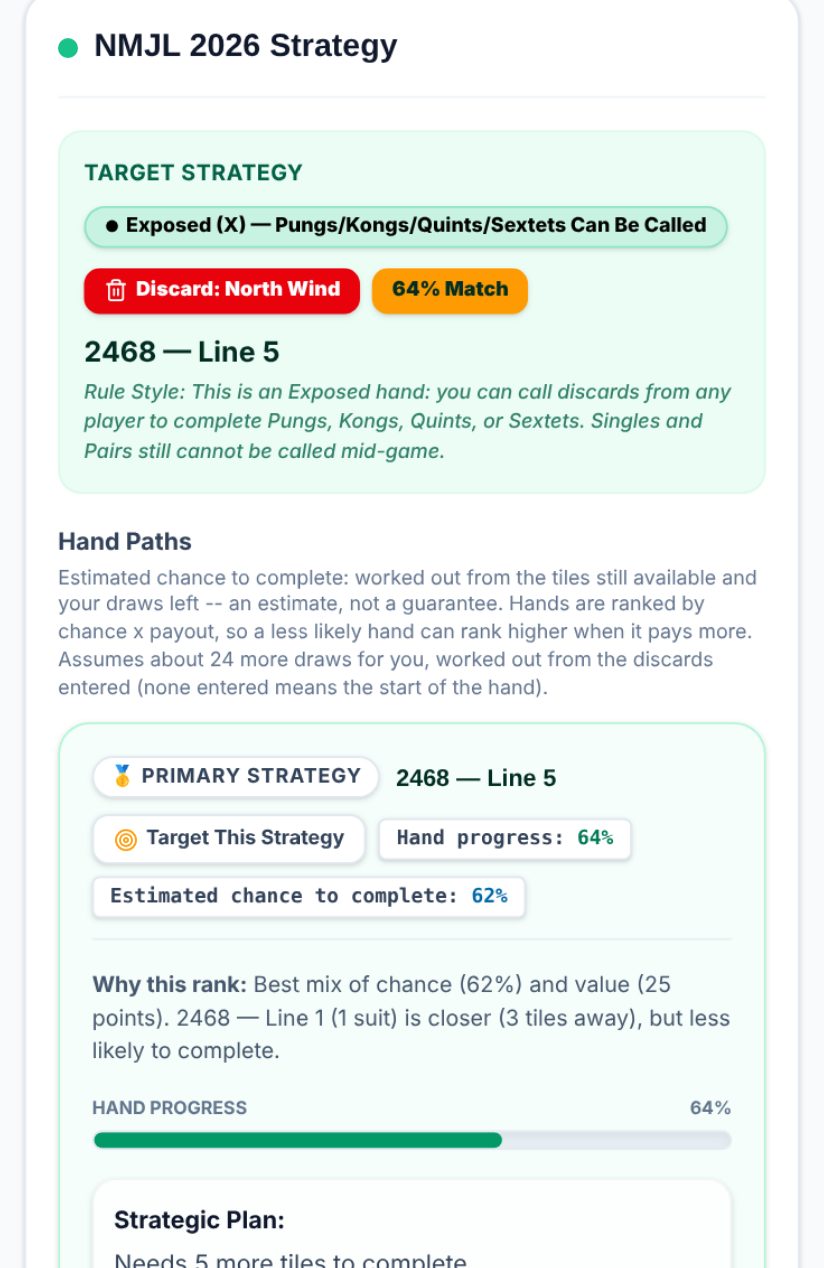
The card line to aim for, what to discard first, and how much of the line you already hold. The badge says whether that line is Exposed (X) — Pungs, Kongs, Quints and Sextets may be called from any player — or Concealed (C). Singles and pairs can never be called.
Hand Paths
Every realistic line, each with its estimated chance to complete — worked out from the tiles still available and the draws you have left — and its card value. Lines are ranked by chance × payout, and Why this rank explains the choice, for example a closer line that's less likely to finish.
Keep and discard
The Visual Rack Guide shows which tiles to keep and which to let go, in order.
The Charleston
With 14 tiles on your rack (13 if you're not the dealer), tap Charleston. The helper walks you through each pass.
Read where your rack leans
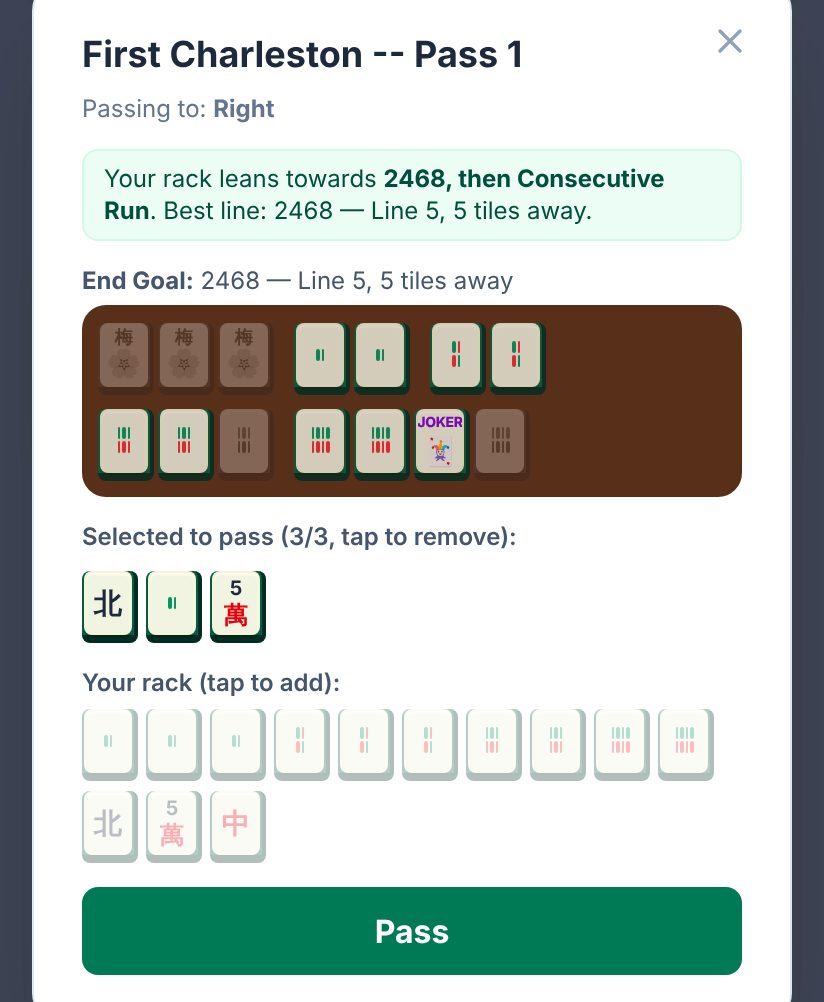
The helper names the card sections your rack leans towards and its best line — the End Goal — with how many tiles away it is.
Check the three suggested tiles
Three tiles are already chosen to pass, never a Joker. Tap one to put it back; tap a tile in Your rack to pass it instead.
Pass, then enter what you receive
Tap Pass and add the three tiles passed to you. The helper moves on: right, across, then left for the first Charleston.
Second Charleston?
After the first Charleston the helper asks whether the table is doing a second one, and makes its suggestion.
Exposures in Board Evaluator
Board Evaluator adds two panels for NMJL: Your Exposures and Opponents' Exposures. Choose the group size — Pung (3), Kong (4), Quint (5) or Sextet (6) — and how many Jokers it holds, then tap its tile. Don't add your exposed tiles to your rack as well. Opponents' exposures are counted as tiles you can no longer get, which changes the chances on every line.
Live Co-Pilot with NMJL 2026
Live Co-Pilot works the same turn-by-turn way described in its own guide page, with the recommendations themselves driven entirely by the 2026 card.
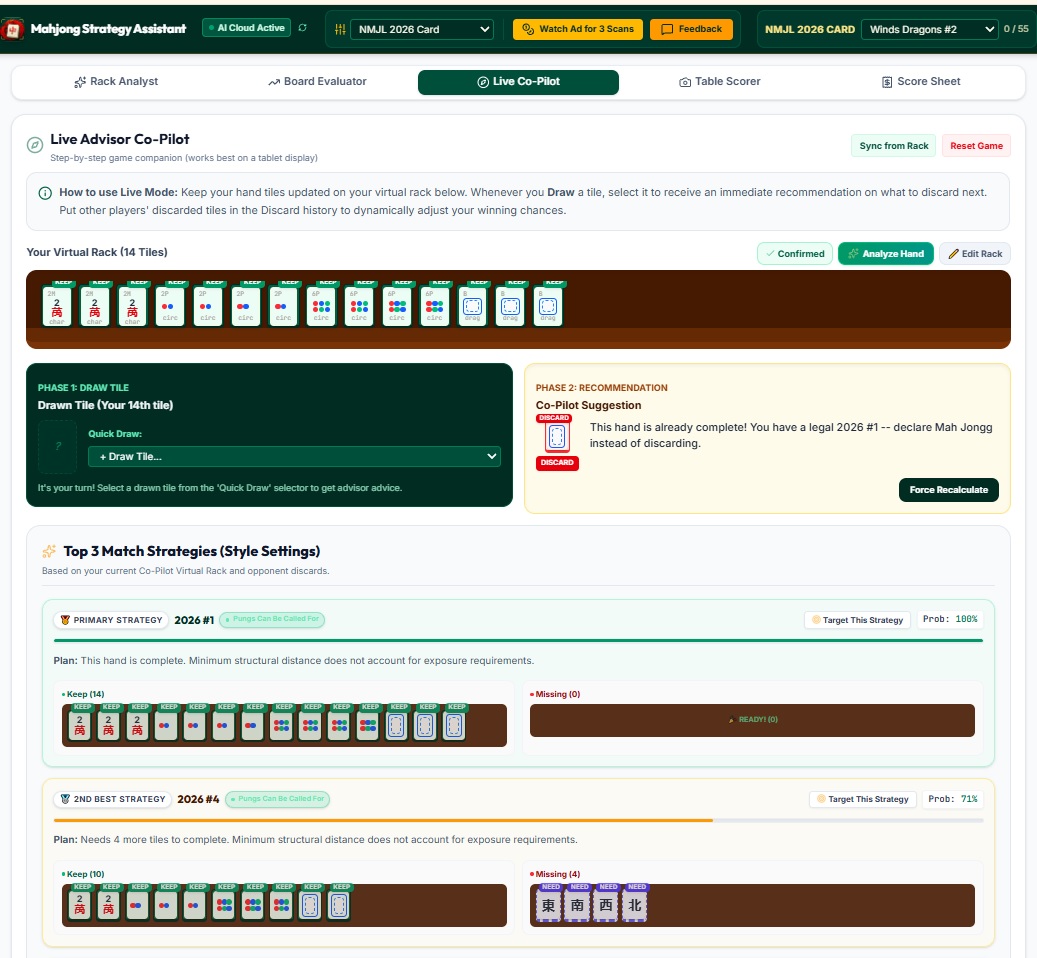
Top 3 Match Strategies
Instead of one single suggestion, Co-Pilot shows up to three candidate hands from the card at once — a Primary Strategy and up to two runners-up — each labeled with its card position (like 2026 — Line 1) and a completion probability.
Keep and Missing, per strategy
Each candidate shows exactly which tiles in your rack count toward it (Keep) and exactly which tiles you still need (Missing) — so you can compare a hand that's nearly there against a riskier one with a better payout, before committing.
Target This Strategy
If one of the runner-up hands looks like the better bet, tap Target This Strategy to lock Co-Pilot onto it directly, the same as picking it from the top-bar dropdown.
Declare instead of discard
When a hand is already complete and legal, Co-Pilot's recommendation changes from a discard suggestion to telling you to declare Mah Jongg instead — it won't suggest breaking up a finished hand.
Force Recalculate
If your rack or the discard history changes in a way Co-Pilot hasn't picked up automatically, tap Force Recalculate to refresh all three strategies immediately.
Each strategy is tagged with whether that specific card line allows exposed melds — some 2026 hands must stay fully concealed until the winning tile, others allow pungs and kongs to be called from other players throughout. This badge reflects the card's own rule for that exact hand, not a general setting.
Joker exchange
When an exposed group on the table — yours or an opponent's — holds a Joker and you have the real tile it stands for, Live Co-Pilot shows Joker Exchange Available. Swap your real tile in and take the Joker before you discard, or ignore it — for your own group, keeping the real tile lets you aim for a Jokerless win. You can't call a discard and exchange a Joker in the same move; do them one after the other.
Table Scorer with NMJL 2026
Table Scorer works as described in the Table Scorer guide. With the Camera Referee, photograph the winning hand with Quick Score (or the whole table with Full Table); the app matches the tiles to their 2026 card line and values the hand from the card. Jokers are read from the photo — check each one before scoring. Then tap Log this hand to Score Sheet to settle it. A hand you played in Live Co-Pilot can be sent with Score this hand instead of a photo. The Manual Calculator takes the hand's value straight from the card, Jokerless, and Self-Draw or Discard, and shows who pays what.
Score Sheet with NMJL 2026
Session tracking — player setup, running standings, dealer rotation — works exactly as described in the Score Sheet guide. NMJL 2026 hands add a few fields of their own to the Log Hand Manually panel:
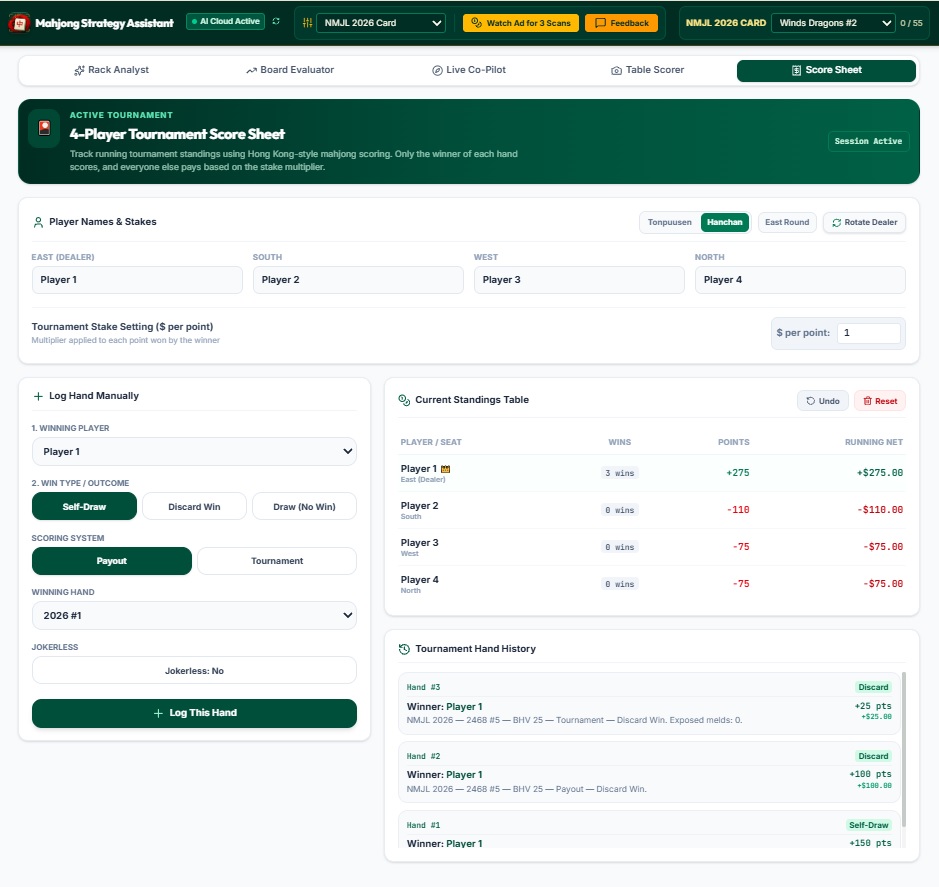
| Field | What it means |
|---|---|
| Scoring System | Choose Payout or Tournament — see below, since these calculate winnings differently. |
| Winning Hand | Pick the exact card line that won, by its card position (for example 2026 — Line 1) — this determines the hand's base value. |
| Jokerless | Mark whether the winning hand used no Jokers at all. Jokerless hands are worth more on hands where the card allows it; this toggle only appears for hands where it actually applies. |
| System | How a hand is settled |
|---|---|
| Payout | Jokerless doubles the hand's value. On a discard, the discarder pays double the value and the other two pay it once. On a self-pick, all three pay double. There's no wall game in Payout — log a draw under Tournament. |
| Tournament | The winner scores the card value, +10 for a self-pick and +20 for Jokerless. On a discard win, the discarder loses 10 — 20 if the winner had two sets exposed, 25 for three or more — and the others are unaffected. A wall game gives all four players +10. |
The Score Sheet shows the points and the money: points times the $ per point stake. Set the stake to 0 to play for points only.
Once logged, the hand appears immediately in Tournament Hand History with its card line, base hand value, scoring system, and win type, and the Current Standings table updates with the new running totals for every player.